
How to Make Cut and Paste Worksheets and Other Printables with GraphicStock
This post may contain affiliate links. Please read my Disclosure and Privacy Policy.
Thank you to GraphicStock for sponsoring today’s post and inspiring these fun printables!
I love printables, especially those that are free! But sometimes I struggle to find exactly what I want online. If you’ve ever felt overwhelmed by the idea of creating your own printables, don’t! GraphicStock makes it easy, no matter what your skill level. My contributing writer Janelle is a graphic designer so she had fun this past week trying out what GraphicStock has to offer, including free graphics. She created this adorable Build a Snowman kids activity. Would you like to learn how to make cut and paste worksheets and other printables with GraphicStock?
GraphicStock has so many fun Christmas and winter DIY stock images/ to chose from.


And because you can get a seven day trial, you can get started immediately creating your own printables with free images! This is a great way to try it out and see the value before committing to a subscription.
Select any graphic and scroll down to see “Similar Images” for more great designs. Many of these would make great holiday greeting cards.

You can easily save graphic ideas by creating folders.

Janelle searched for “scrapbook paper” and found several fun holiday designs with multiple papers in a single download option.
Download an EPS if you’re working in Adoble Illustrator for the most versatile design file with parts you can fully customize and pull apart. Download a JPG or PNG if you’re working in Pic Monkey and want to use the design as-is. GraphicStock offers plenty of designs ready to print so you don’t need to be an expert!

GraphicStock has several designs with varying color options.

Janelle simply cropped this one to a 4×6.

You can print this for an easy home decor or gift idea! Simply add your print to a pretty frame.

She printed this one on photo paper for a glossy design.

Have you ever wanted to make your own treat bag tag?

You can also edit in Adobe Illustrator by moving the title down, changing the text and printing your own treat bag labels.

These were sized to fit my 6 inch treat bags so they only had to be cut out and folded over. Four printed on a single piece of cardstock.
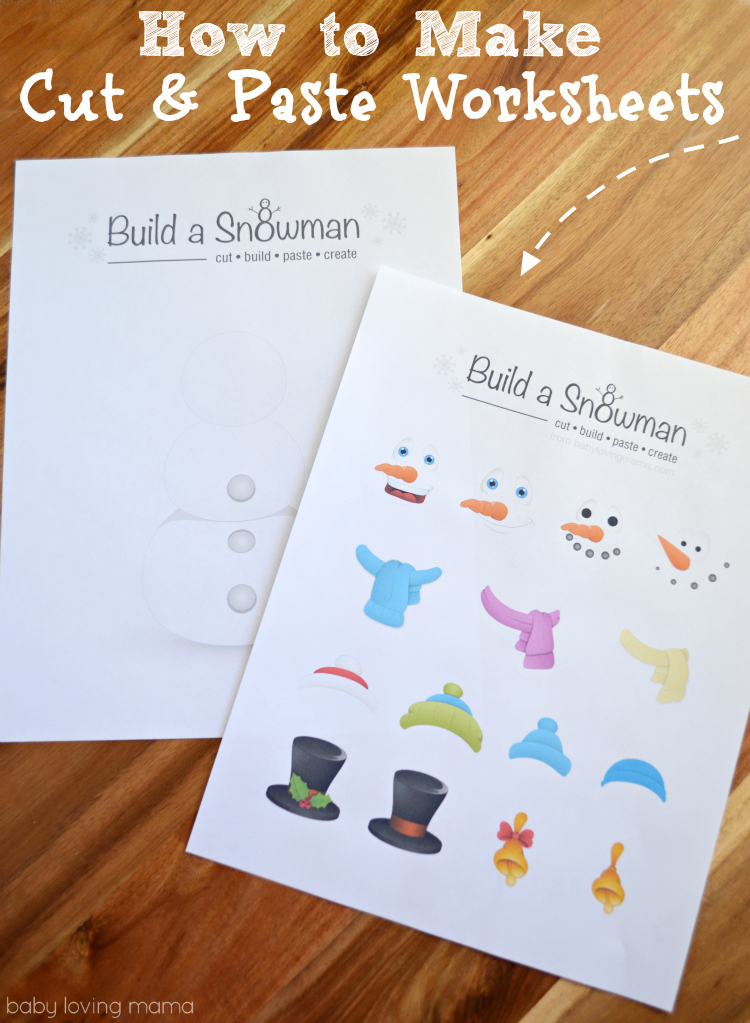
Janelle also created these Build a Snowman Cut & Paste Worksheets.


She spotted these snowman faces and hats on GraphicStock and knew they’d work perfectly as options.

She created her own headline and applied it to a blank snowman by simply removing the face and accessories from a GraphicStock image.
A pre-designed graphic was customized it to make a cover page for the snowman craft so it easy to package as a gift to a friend.

She pulled the graphics from the bottom off and applied a new headine on the bottom. She used the snowman graphic to add interest to the top and bottom text and put the little hat on his head.

She saved the headline as a JPG to import into PicMonkey.
She then imported images into PicMonkey as a collage.
You can drag/drop your images. If you lock the page size at about 2500 x 3300 it will be a letter sized sheet (8.5 x 11).
Adjust spacing or add patterns or graphics right from PicMonkey if you’d like. Cut page into strips and then cut each object out. You can use a glue stick or double sided tape, whichever you prefer. You can draw on the arms and any other accessories you’d like.
For a added snow effect, try glitter glue! This is a perfect snowy day activity.

Download the Build a Snowman Cut and Paste Worksheets:
Build a Snowman Cut and Paste Worksheet (PDF)
Build a Snowman Cutout Page (PDF)
GraphicStock Value
GraphicStock is an affordable, subscription-based stock media site that gives you unlimited access to stock graphics, vectors, infographics and more. Get the same content you would find on more expensive stock sites. They are continuously adding new content to the library so it stays fresh.
Unlimited Downloads
• Unlimited downloads to the library of 250,000 graphics, images, vectors, icons, and more
• On average subscribers pay less than a dollar per download over the course of a year
Simple, Unrestricted Licensing
• Everything is 100% royalty-free
• Unrestricted usage rights for personal or commercial projects
• Keep what you download and maintain usage rights forever

GraphicStock Free Trial
Right now you can sign up with GraphicStock for a 7 day free trial and download up to 140 graphics to try it out. If you decide not to use GraphicStock, just cancel your account before the 7 day trial period is up.
GraphicStock Challenge Giveaway:
GraphicStock would like to offer a $25.00 Amazon Gift Card to inspire you to create something this holiday season. The project can be as easy or as complicated as you want!
How to Enter:
- Sign up with GraphicStock 7 day free trial. (Don’t forget to cancel before your 7 days are up if you don’t want to continue with your subscription.)
- Create a holiday printable with GraphicStock graphics and share a picture of your creation on social media using #GraphicStockChallenge or #GraphicStockHolidayChallenge
- Drop a link to your creation in a comment below to be entered into the contest!
This giveaway ends at 11:59 pm CST on December 12th, 2015. Entrants must be over 18 years of age or older. The project you create must be your own and use graphics available on GraphicStock. Winner must respond within 72 hours or a new winner will be chosen.
i love these cardstocks for snack bags and presents. i def could make these ahead of time and throw in some treats.